
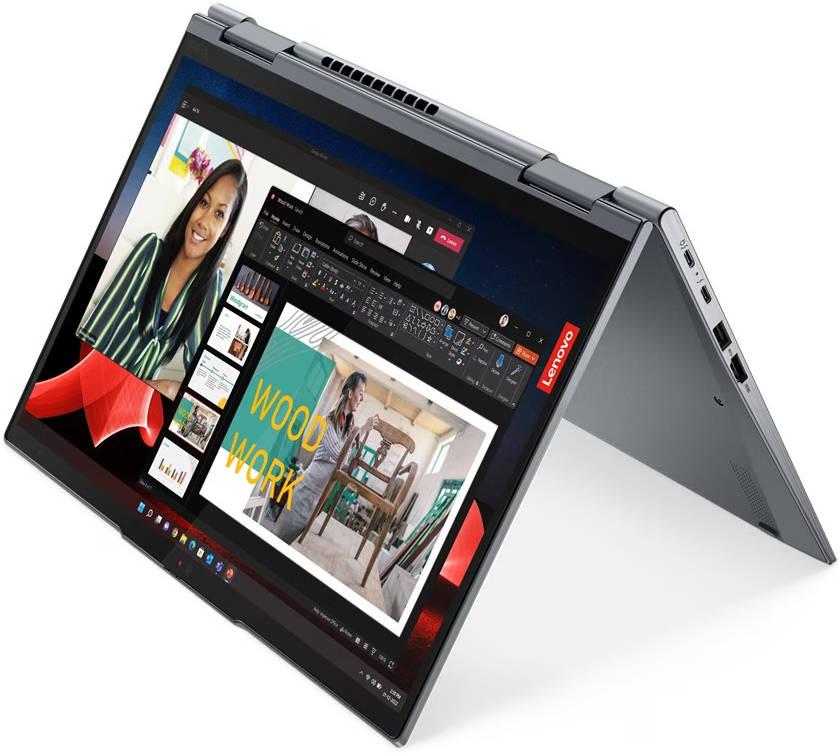
Unofficial specifications
RAM SlotsSoldered | Thunderbolt VersionThunderbolt 4 |
Processor BrandIntel | Build MaterialCarbon Fiber |
Display TypeOLED | Backlit KeyboardYes |
dupll3 Years | Special FeaturesTPM 2.0, IR camera, 360-degree hinge |
EthernetNo | SD Card ReaderNo |
Operating SystemWindows 11 Pro | Product DescriptionBlack |
Weight1.33 kg | Storage512 GB SSD |
TouchscreenYes | HDMI PortsHDMI 2.0 |
ChipsetIntel Platform Controller Hub | RAM16 GB |
Processor Cores12 | Battery48 Wh |
3.5mm Audio JackYes | BrandLenovo |
Processor Generation12th Gen | Storage Capacity512 GB |
Battery Capacity48 Wh | Keyboard LanguageEnglish/Bangla |
Model NameThinkPad X1 Yoga Gen 8 | Model Number2023 |
Screen Size14 inches | Cooling TechnologyDual Fan |
Frequency (Hz)90 | App ControlNo |
Available ColorsBlack | USB Ports2x Thunderbolt 4, 1x USB-C |
Warranty3 Year Onsite Warranty | Bluetooth VersionBluetooth 5.2 |
Standby TimeUp to 10 hours | Camera Features1080p FHD IR |
Storage InterfaceNVMe PCIe Gen4 | Ram16 GB |
Battery TypeLithium-polymer | Clock Feature18 MB cache |
Cooling SystemDual Fan | Audio Jack3.5mm Combo Jack |
Wifi SupportWi-Fi 6E (802.11ax) | Gpu TypeIntegrated |
Display CharacteristicsOLED, 400 nits | Graphics CardIntel Iris Xe |
Usb TypeUSB 3.2 Gen 2 | Cpu TypeIntel Core i7 |
dup34341.33 kg | Resolution2880 x 1800 pixels |
SensorsMatch-on-chip fingerprint | Processor Threads16 |
Display Size14 inches | Wireless ChargingNo |
Dimensions312.4 x 220.7 x 14.95 mm | Body TypeCarbon Fiber |
RAM ExpandableYes (up to 64GB) | Storage ExpandableYes (M.2 slot) |
Display Touch SupportYes | Device Type2-in-1 Laptop |
Audio QualityDolby Atmos Speakers | RAM Speed4800 MHz |
Graphics VRAMShared | Build StandardMilitary Grade |
Charging Speed65W USB-C | Processor ModelCore i7-1260P |
Screen Resolution2880 x 1800 pixels | Refresh Rate90 Hz |
Processor Speed2.1 GHz base / 4.7 GHz boost |
Reviewer
Apr 20, 2026
The moment you unbox the Lenovo ThinkPad X1 Yoga Gen 8, the premium build quality will be evident. You'll immediately appreciate the lightweight yet sturdy chassis; it feels solid in your hands while being easy to carry around. The soft-touch surface makes it comfortable for frequent handling, and the sleek aesthetic showcases Lenovo's design sensibility.
Your first glance at the hinges reveals a unique flexibility that allows full 360-degree rotation. This flexibility facilitates its transition from laptop to tablet mode, but you may find it a bit stiff when adjusting angles initially. Overall, this will evoke confidence in its durability, even with regular use in different modes.
The ThinkPad X1 Yoga Gen 8 is powered by Intel's latest processors, promising fast performance for productivity tasks and multitasking necessities. During benchmarks, you'll notice significant speeds that live up to the marketing hype, excelling in everyday applications like web browsing and document editing. Expect to see swift boot times and application launches; your routine efficiency should noticeably improve.
However, under continuous heavy loads—like video rendering or intensive gaming—the performance starts to throttle. This can lead to frustrating slowdowns after several minutes of high-demand tasks. While casual users might overlook it, power users will likely find it limiting, particularly if intense work sessions are part of your daily grind.
When pushing this device hard, expect substantial heat buildup; the fan noise can become noticeable as it tries to cool things down. With extended use or demanding applications running simultaneously, this heat could hinder comfort levels significantly during long sessions on your lap or desk.
Your experience might vary depending on usage habits; if you're performing lighter tasks or using it in tablet mode, temperatures remain within a manageable range. But for those who like running multiple demanding programs simultaneously, you'll face notable heat issues that could affect performance over time.
The display on the X1 Yoga Gen 8 impresses right out of the box with vibrant colors and sharp details thanks to its high resolution. You’ll enjoy clarity whether streaming videos or working with photos. Sunlight visibility is another strong suit; even outdoors, you won't strain your eyes trying to view the screen.
Furthermore, color accuracy is commendable; designers and photographers will appreciate how true-to-life images appear. However, do keep in mind that while brightness levels are generally adequate for various environments, they might not satisfy extremely bright locations if maximum lumens are crucial for your tasks.
Battery life ranges widely based on individual usage patterns but all-day performance may not be guaranteed under heavy workloads. In typical office work scenarios involving web browsing and document management, you could stretch into an entire workday without reaching for the charger. However, putting some demanding applications through their paces will leave you scrambling for a power outlet sooner than expected.
The charging speed is impressive; a quick top-up provides enough juice for several hours of moderate use in just a short period. This is helpful when you're often on-the-go and can't afford long charging outages. Unfortunately, if you rely heavily on graphic-intensive tasks or extensive multitasking, prepare yourself for battery life that simply won’t keep pace.
The camera quality is adequate for video conferencing—perfectly acceptable for meetings—but don’t expect stellar images in low light conditions when using it as a primary tool for content creation or snapshots. While Lenovo includes software enhancements that aim to improve your appearance during calls, these filters sometimes feel overdone or artificial.
You’ll likely notice that background noise becomes more apparent among poorly lit environments despite efforts at noise reduction. Ultimately, while functional for basic communication needs during remote work situations, significant limitations exist when aiming for professional-grade quality.
This laptop presents itself as an attractive option aimed primarily at business professionals and casual creators alike who need flexibility without compromising too much on performance or build quality. You'll discover strengths such as great keyboard feedback and portability worth praising while recognizing thermal management issues warrant concern during heavy multitasking.
If you're seeking an all-around performer for lighter tasks combined with versatility presented via its convertible design without stepping into extreme performance territories occasionally demanded by gamers or creators—it fits nicely into your toolkit. For anyone relying on intensive graphics capabilities regularly? A few roadblocks may complicate your path ahead with this specifically tailored device.
Share feedback or ask a question about this product.